KHTS Radio Santa Clarita Radio – Santa Clarita News


We store a vast amount of important data on our disks, from personal photos and videos to crucial business documents. Losing this data can be a devastating experience, both personally and professionally. Sometimes, it may even lead to financial losses or legal repercussions.
Therefore, it is important to be aware of the risks associated with data loss and to have a reliable data recovery software in place. Wondershare Recoverit recovery software can help you recover lost data.
This article guides disk recovery with a spotlight on Wondershare Recoverit. This article will discuss the causes of data loss, the different types of disk recovery software, and the steps involved in recovering data using Wondershare Recoverit hard drive recovery software free.
Whether you are a novice or an experienced computer user, this article will provide the information and resources you need to recover your lost data quickly and easily. So let’s start:
Understanding Disk Data Loss
Disk data loss can occur due to a variety of factors, including:
Accidental deletion:
It is easy to accidentally delete files from a disk, especially when working with many files. It can happen by pressing the wrong button, mistaking one file for another, or deleting a folder containing important files.
Formatting:
Formatting a disk erases all of the data on it. It may be done intentionally to prepare the disk for use with a new device or to delete all the data. However, it is also possible to accidentally format a disk.
Corruption:
Disk corruption can occur due to various factors, such as power surges, virus infections, and physical damage. When a disk is corrupted, accessing its data may not be possible.
Tips for preventing data loss:
- Back up your data regularly. It is the most important thing you can do to protect your data from loss.
- Be careful when deleting files and formatting disks.
- Handle your disks with care to avoid physical damage.
If you experience data loss, stop using the disk immediately and contact a professional data recovery service like Wondershare Recoverit.
The Role of Data Recovery Software
Data recovery software can be a powerful tool for recovering lost data, but it is important to note that it is only sometimes successful. The success rate of data recovery software depends on various factors, such as the type of data loss, the severity of the damage, and the quality of the data recovery software.
When choosing a data recovery software program, it is important to select one compatible with the storage device you are trying to recover data from, and that supports the types of files you are trying to recover. Choosing a data recovery software program from a reputable company is also important.
Wondershare Recoverit: A Leading Data Recovery Tool
Wondershare Recoverit is a leading data recovery tool that recovers lost data from hard drives, USB drives, and external hard drives. It is known for its user-friendly interface, compatibility with distinct storage devices, and high recovery rate.
Image Source: Wondershare Repairit
Key features of Wondershare Recoverit:
High recovery rate:
Wondershare Recoverit has a high recovery rate, even for data that has been formatted or corrupted.
User-friendly interface:
It has a simple interface that makes it easy to use, even for beginners.
Compatibility:
Wondershare Recoverit data recovery software is compatible with a wide range of storage devices.
Supports a variety of file types:
Wondershare Recoverit supports various file types, including photos, videos, documents, music, etc.
Free trial available:
Wondershare Recoverit offers a free trial, so you can try it before you buy it.
Overall, Wondershare Recoverit is a powerful and reliable data recovery software tool perfect for recovering lost data from various storage devices. It is easy to use, compatible with a wide range of storage devices and has a high recovery rate.
Benefits of using Wondershare Recoverit:
Recover data from almost every storage device, including hard drives, memory cards, USB drives, and external hard drives.
- Recover data that has been deleted, formatted, or corrupted.
- Recover various file types, including photos, videos, documents, music, etc.
- Easy to use, even for beginners.
- High recovery rate.
- Compatible with various OS, including Windows and macOS.
- Free trial available.
Suppose you have lost data from a storage device. In that case, Wondershare Recoverit free disk recovery software is a powerful and reliable data recovery software tool that helps you recover your lost data quickly and easily.
Step-by-Step Guide to Disk Recovery with Wondershare Recoverit
Step 1: Download and Install Wondershare Recoverit
Visit the official Wondershare Recoverit website. Install the software on your computer.
Step 2: Select the Disk
Launch Wondershare Recoverit. Choose the specific disk or storage device from which you want to recover data.

Image Source: Wondershare Repairit
Step 3: Start the Scan
Click “Start” to initiate the scanning process. Recoverit will search for lost or deleted files on the selected disk.
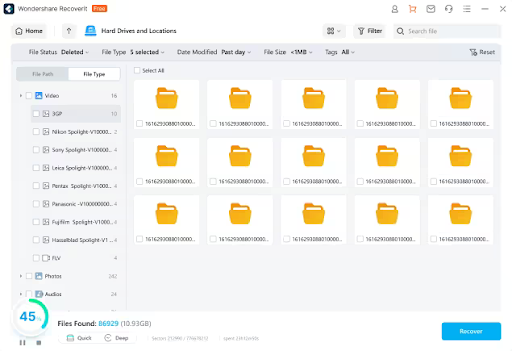
Image Source: Wondershare Repairit
Step 4: Recover Your Data
When the scan is complete, preview the recoverable files. Select the files you want to recover and click “Recover.” Choose a location to save your recovered files, preferably on a different disk.

Image Source: Wondershare Repairit
Recommendations for safely handling and storing disks
- Keep your disks clean and dust-free. Dust can build up on disks and cause them to overheat, leading to data loss.
- Store your disks in a cool, dry place. Avoid storing your disks in extreme temperatures or direct sunlight.
- If you will not use a disk for an extended period, store it in a protective case. It will help to protect it from dust and physical damage.
Final Words
Data is the lifeblood of the digital age, making data recovery an indispensable practice. Protecting your disks through regular maintenance, data backups, and encryption is paramount.
When data loss strikes, Wondershare Recoverit free hard drive recovery software stands as a trustworthy ally. Its user-friendly interface, compatibility, and proven effectiveness make it the preferred choice for disk recovery.
To safeguard your digital assets and embark on a journey to successful disk recovery, don’t wait. Act promptly, explore the power of data recovery tools, and take control of your valuable information. Your data’s safety and retrieval are within reach with Wondershare Recoverit.
Wondershare Recoverit Free Download:
Click below to download Wondershare Recoverit.