KHTS Radio Santa Clarita Radio – Santa Clarita News

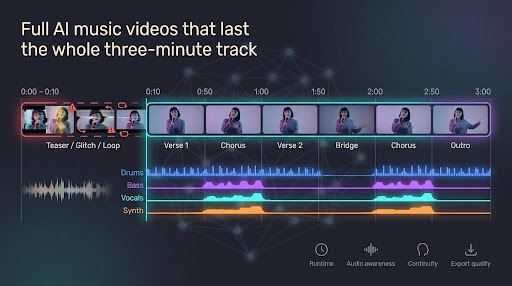
Short-clip AI video tools nail a 10-second teaser, then melt by the second verse—faces morph, beats drift, footage loops. If your three-minute track is mixed and you need visuals that last the whole ride, stay here. We pored over vendor docs, pricing pages, and release notes—no hands-on hype—to surface six AI music-video platforms that deliver full-length, watermark-free exports. We ranked them by maximum runtime, beat- or stem-level sync, continuity controls, and the real cost of a 1080p-plus master. Here’s what we found.
What Matters Across a Full Three-Minute Track
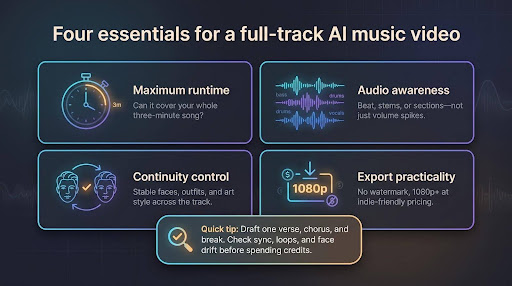
A three-minute song isn’t static. It leaps from verse to chorus, pauses for breath, then ends with a final cymbal hit. To keep pace, we rated each platform on four factors:
- Maximum runtime. Anything capped at 90 seconds cuts your bridge.
- Audio awareness. Beat-, stem-, or section-level mapping keeps visuals synced instead of just reacting to volume spikes.
- Continuity control. Stable faces, outfits, and art styles stop your singer turning into a stranger; bonus points if you can swap one bad shot without rerendering the whole timeline.
- Export practicality. You need a watermark-free 1080p-or-better file at a price an indie budget can handle.
Quick tip: Run the cheapest draft that covers one verse, a chorus, and a quiet break, then check for desync, loops, and face drift before spending real credits.
Full-Track Comparison at a Glance
Check the specs, note any ceiling that clips your song, then move to the deep-dive sections that follow.
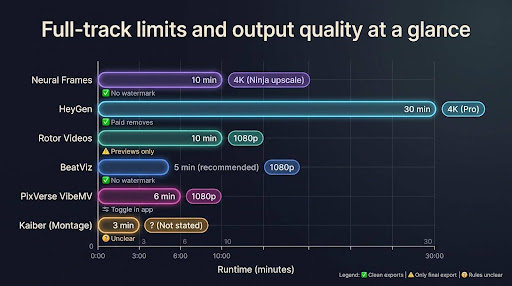
| Tool | Full-track limit | Max output | Cheapest plan without watermark | Watermark rule | Source |
| Neural Frames | 10 min | 4K upscale (Ninja) | $39/mo or $26/mo annual | None | neuralframes.com/pricing |
| HeyGen | 30 min | 4K (Pro) | $29/mo | Removed on paid plans | heygen.com/faq |
| Rotor Videos | 10 min | 1080p | ≈ $18–$27 per HD export (3 credits) | Previews only | rotorvideos.com/pricing |
| BeatViz | 5 min* recommended | 1080p | $25.90/mo or $20.70/mo annual | None | beatviz.ai/pricing |
| PixVerse VibeMV | 6 min + 15 MB cap | 1080p | $19/mo | Toggle in app | pixverse.ai/blog/how-to-make-ai-music-video |
| Kaiber (Montage) | 3 min | Not stated | $10/mo (Starter) | Unclear | feedback.kaiber.ai/changelog |
*Vendor docs set no hard limit but advise ≤ 5 min for stable results.
Need 4K? Start with Neural Frames or HeyGen. Songs over six minutes rule out Kaiber and PixVerse; tracks longer than ten minutes send you straight to HeyGen.
1. Neural Frames
Neural Frames’ Discover gallery streams full-length customer videos that were built with the same stem cues, letting you see a kick drum trigger flashes while a vocal line nudges the colour grade. Instead of reacting only to volume spikes, the engine extracts eight stems (drums, bass, vocals, and more) so you can map visual effects to each instrument.
Neural Frames AI music video interface screenshot
Autopilot auto-detects BPM, song structure, and energy so Suno musicians can turn a Suno track into a video in one upload, while the frame-by-frame editor stays on hand for precise control. The Neural Knight plan ($39/mo or $26/mo annual) removes the watermark, while the Neural Ninja plan ($99/mo or $66/mo annual) adds 4K upscaling and access to every AI model. A 10-minute ceiling (15 minutes in Autopilot) covers full-length tracks without cutting your bridge.
2. HeyGen
Why HeyGen Fits Performer-First Videos
Upload your mastered track, choose one avatar, and HeyGen’s lip-sync engine matches every phoneme to a mouth shape, so lyrics land as live vocals (see the HeyGen talking-avatar tool). Scene breaks follow detected song sections, letting verses, hooks, and a half-time bridge breathe at their own pace.
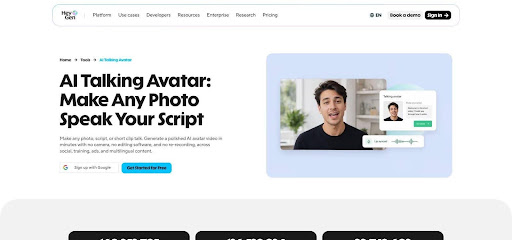
HeyGen AI talking avatar music video interface screenshot
Runtime is generous. The Creator plan ($29/mo) exports 1080p videos up to 30 minutes without a watermark, while the Pro plan ($49/mo) lifts output to 4K. Both plans keep a single-avatar look across every scene, according to HeyGen’s FAQ.
You can shuffle or trim scenes in the browser editor without regenerating the whole cut, handy for last-minute lyric tweaks. The trade-off: purely instrumental passages get less visual nuance because HeyGen leans on vocal cues. If your concept spotlights a guitar solo, run a quick preview before spending credits.
3. Rotor Videos
Rotor takes an editorial route: it cuts stock or uploaded clips to your song’s pulse instead of inventing every frame, so faces stay real and lighting matches from verse to chorus.
Upload the finished track, pick from nine million clips, and Rotor builds a timeline up to 10 minutes, according to the Rotor Videos help center. Three credits buy a 1080p music video (≈ $18–$27, bundle dependent). Previews are free but watermarked; only the purchased render is clean.

Rotor Videos AI music video editor with stock clip timeline
Creative control is limited. You can change styles or swap a clip, but you can’t lock a specific shot to the bridge or stretch a solo without regenerating. Rotor advises 6–10 clips per minute of audio (about 18–30 for a three-minute song) to avoid repetition. Gather that footage before you click Render.
4. BeatViz
BeatViz acts like an AI director: it pitches first, edits second. Upload the track and it drafts a full script (concept, shot list, and camera moves) before you spend a single credit, so you can cut weak scenes on paper instead of paying to render them.
The platform recommends songs under five minutes for best stability, according to the BeatViz support page. Longer files are allowed but may slow processing or drift. After you approve the storyboard, BeatViz renders a 1080p timeline inside a real editor where you can swap a prop, extend a pan, or tighten one cut without touching the rest.
Pricing starts at $25.90 per month ($20.70 on annual billing) with 1,800 monthly credits and no watermark. Character consistency improved in the last model refresh, yet a clear reference photo and a two-second preview loop remain wise insurance before you commit the final credit.
5. PixVerse VibeMV AI
VibeMV lives inside PixVerse as a simple three-step flow: upload your song, choose a video and music style, then let the engine stitch a lyric-ready MV. The guardrails are firm: 10 seconds to 6 minutes and under 15 MB per file (MP3 or WAV).
The Hobby plan costs $19 per month for 600 credits. Any paid tier removes the watermark, and the in-app meter shows cost as soon as the track length loads. Drafts render in 720p or 1080p and stay synced to detected song sections; if a cut jars at 2:47, you’ll need a full regenerate.
Quick tip: down-mix to a 320-kbps MP3 if your master exceeds 15 MB, and always watch the final 20 seconds because repetition can creep in once the algorithm runs out of fresh ideas.
6. Kaiber
Kaiber’s Music Video Montage in Canvas moves quickly: drop your song, add a short prompt, choose 1-, 2-, or 3-minute length, and it builds the entire clip. A July 8 2026 release note sets a firm 3-minute ceiling. Anything longer needs stitching or another Kaiber tool.

Kaiber Music Video Montage in Canvas interface screenshot
Montage excels at bold, stylised reels because every shot shares one palette and motion language. Edits are all-or-nothing: if a frame flops at 1:42, you regenerate the set. Canvas supports 4K, yet Kaiber docs do not confirm whether Montage inherits that tier, so check before you pay.
Plans start at $10 per month (Starter, 500 credits). The $29 Creator plan unlocks Beat Sync, extra models, and timeline edits. Reach for Montage when you want a punchy, art-driven clip under three minutes; choose another option for longer or pixel-critical projects.
Conclusion
Every tool listed above can deliver a watermark-free video that runs the length of a standard three-minute song, but they differ in runtime ceilings, sync intelligence, and price. Match the platform to your track length, visual style, and budget before you invest credits.